 |
|
Saving the Tutorials to your hard drive. Using Microsoft Internet Explorer |
| 1. Go to the "File" pull down
menu, on the top left of your browser. Click on "File". 2. Click on "Save As", and a "Save Web Page" window will pop up...see pic below.. |
|
| 3. Use the this window to locate a place on you hard drive to save the Web Page..I'll chhose the Temp Folder on my "D:" drive. |
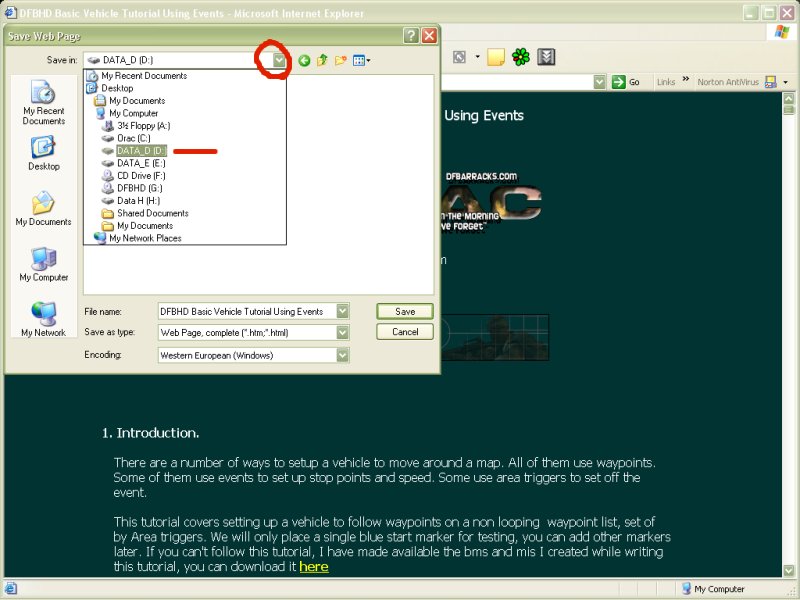 |
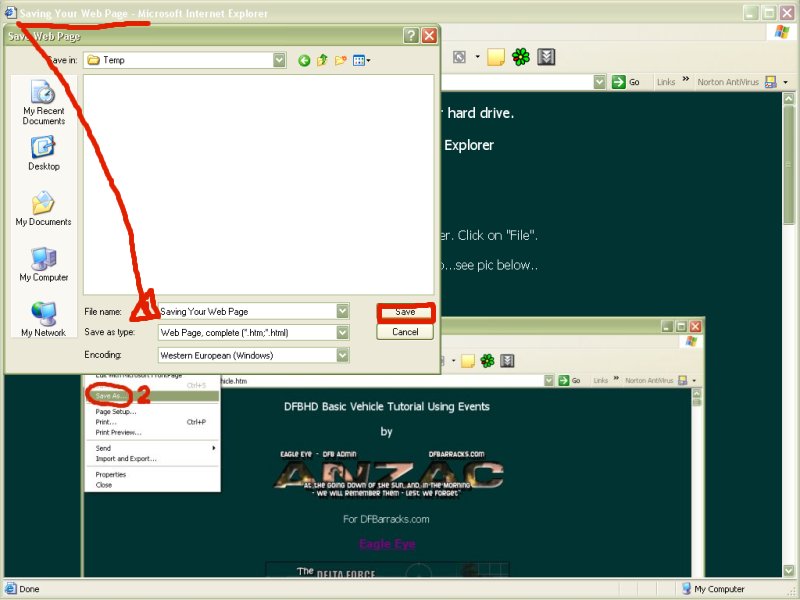
| 4. Notice that the name of the Web
Page at the Top of the browser, is automatically placed into the "File
Name" box. 5. Click the "Save" box. 6. That's it..now you can use your "Windows Explorer" to locate the html file, then, double click on the file, and the page will open up in your browser. |
 |
|
Thanks, any questions, email me at... Eagle Eye. |